
Allbest barcode tool app
Allbest barcode tool app is now available on the App Store and Google Play. The app is free and ad-free.
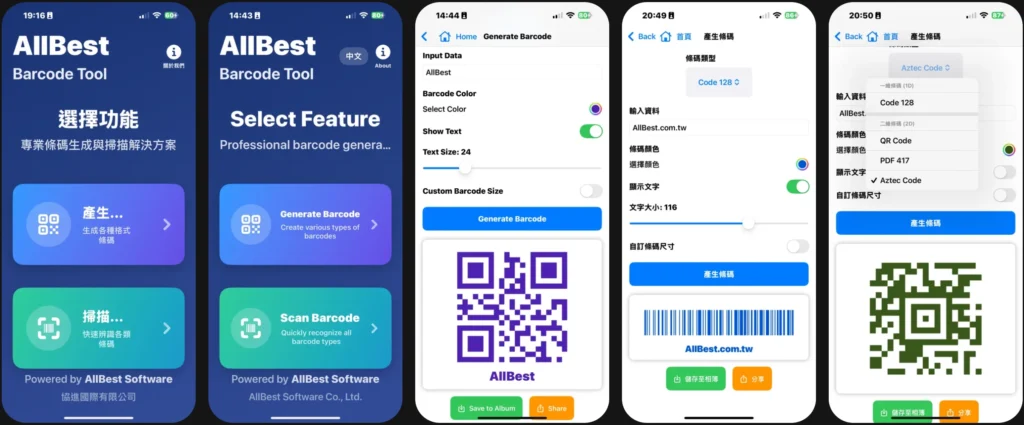
Main functions: "Generate barcodes, scan barcodes, record scanned content, and share generated barcodes and records".
The iOS version supports dual-mode barcode scanning, allowing users to switch between Mode 1 and Mode 2. However, the current version does not yet support standard GS1 barcodes; support for standard GS1 barcodes will be added in the next version.
The Android version can now scan standard GS1 barcodes and can generate a wide variety of barcode types.
You can choose to scan the barcode once or continuously.
The generated barcodes can be saved and shared, and the scanned content can be recorded and shared.
Supports both Chinese and English versions. The iOS version allows manual switching between Chinese and English, while the Android version automatically switches based on the phone's system language.
For everyday use, when scanning QR codes using our app, the app records the URL and time of the scan for easy reference.
The app prioritizes privacy, collects no personal data, completes all processing on the phone, operates without tracking and completely offline (except when accessing websites).
The reason for developing a dual-system barcode app is that we couldn't find a suitable app, or other apps had a lot of ads, and our customers needed to scan barcodes continuously.
We are currently preparing new features for the next version of the app.
It can scan 13 commonly used barcodes:
Barcodes: EAN-13, EAN-8, UPC-A, UPC-E, Code 39, Code 93, Code 128, ITF, Codabar
• Two-dimensional barcodes: QR Code, Data Matrix, PDF 417, Aztec Code
(The Android version can currently scan standard GS1 barcodes; the next iOS version will add support for standard GS1 barcodes.)
iC3D Samples
點擊載入 3D 模型